

Map View & Trip Tracking
Problem
The home page of the app displayed a live map showing vehicles and their current locations, but it provided limited vehicle information and no access to historical data. Users could not see where vehicles had been, when their statuses changed, or their trip paths over time. This made the map useful only as a real-time snapshot rather than a tool for understanding fleet activity or investigating past events.


Research & Wire Frames
We looked at other map solutions, pulling primarily from Google Maps and how they displayed object and location details, using the requirements I created a card design with the information we wanted to be displayed and gathered feedback from the team and stakeholders.
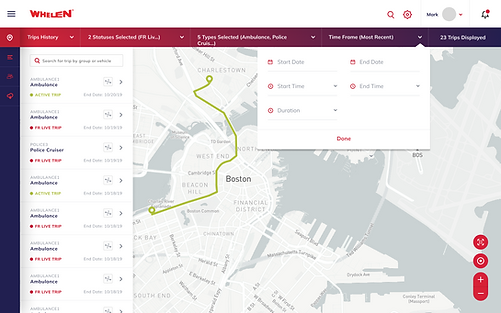
For Trip History we met with internal Whelen team to understand what the user needs were and the value they would get from this view. We were unable to perform user interviews, so we relied on the Whelen team for their industry expertise.


Solution
Our live map solution gave the user a view of all managed vehicles, their statuses (First Responder Mode, Idle, etc), basic vehicle detail, and basic map filters to show specific vehicles or predefined groups. While in the live map we designed easy trip history tracking to see one or more vehicles path while in specific statuses. New trips were triggered by status changes in the vehicle.